



The fastest way to keep your business running during an office move is to appoint a relocation project manager and follow a phased plan that prioritises IT cutover and supplier coordination. Downtime happens when nobody owns the schedule, so fix that first.
In the next 48 hours:
Lead times matter more than most teams expect. JLL recommends starting preparation well in advance to allow adequate lead time, and your biggest cost categories will be removalist fees, fit-out, storage and IT reconnection, with contingency sitting on top of all four.
TL;DR:
- Starting preparations three to six months in advance is crucial, with telecoms and furniture logistics as top long-lead items to order early.
- A single relocation project manager must hold final decision authority and coordinate all phases, including scheduling, vendor management, and contingency planning.
- IT and telecoms are the critical path, requiring early audit, inventory, and sequencing, with a buffer day between physical move and system cutover to prevent downtime.
- The relocation budget should include key costs such as removalist fees, fit-out, storage, IT reconnection, and a contingency of 10 to 20 percent.
- Hiring a specialist mover provides centralized coordination, equipment handling, and insurance, reducing the risk of small logistical errors derailing the entire move.
A relocation succeeds or fails on sequencing, not effort. Long-lead items, particularly furniture and telecoms circuits, dictate the whole programme because they can’t be compressed once ordered late.
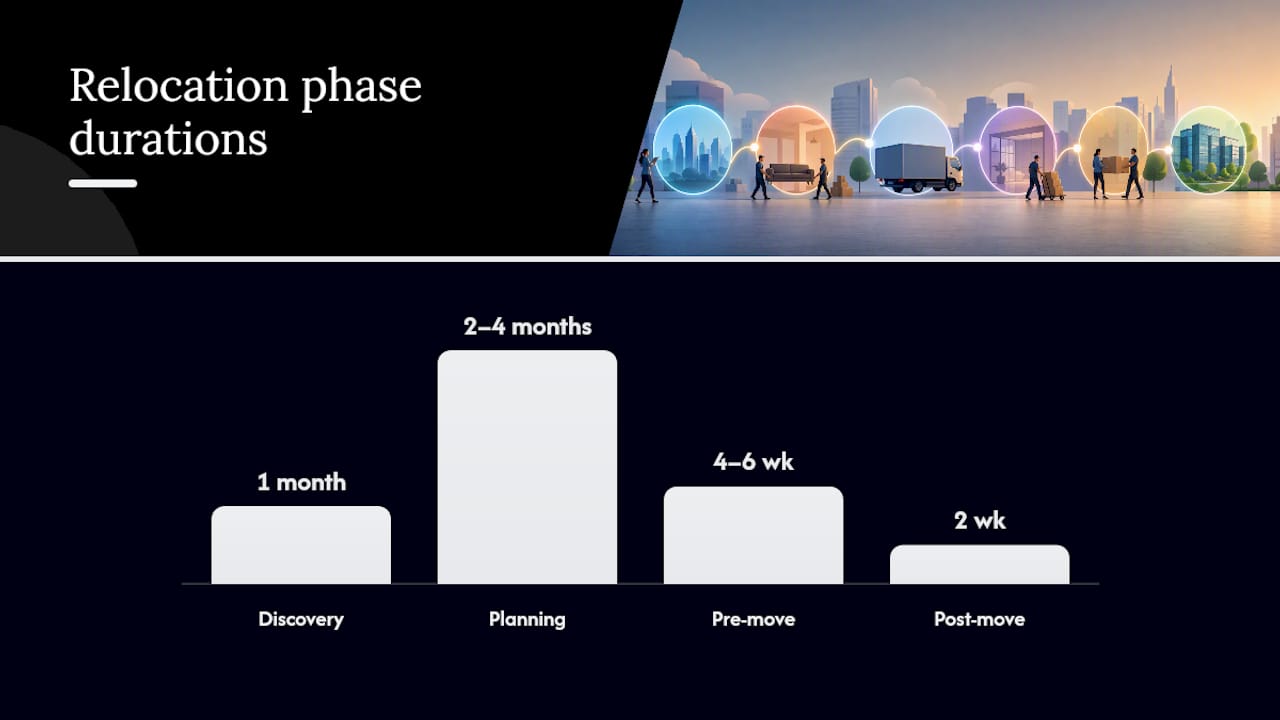
For a small office (under 30 desks), budget three to four months. Medium offices (30 to 150 desks) need four to six months. Anything larger, or with a fit-out involved, should start at six months minimum. Upmove’s phased model breaks this into a planning phase three to six months out, pre-move activity in the final one to two months, then move day itself and a settling-in period after.
Turn each phase into deliverables on a shared schedule, whether that’s a Gantt chart or a simple spreadsheet everyone can see. The point isn’t the tool, it’s visibility.
Pro Tip: Mark every long-lead item (furniture, telecoms, signage) with its order date AND its “last safe day to order” on the schedule. That second date is what actually protects your move-day timeline.
Confusion over decision rights is what turns a manageable move into a scramble. Every relocation needs a small, defined leadership structure, not a committee.
Set a weekly reporting cadence in the lead-up, moving to daily standups in the final two weeks. For move day itself, any issue that threatens the schedule by more than two hours should escalate straight to the project manager, no waiting for the next scheduled check-in.
A realistic budget covers more than the removalist invoice. Build it around clear categories: removalist fees, fit-out and construction, furniture and equipment, IT disconnection and reconnection, temporary storage, and make-good obligations on your outgoing lease.
Make-good costs catch teams out constantly. So does short-term storage when the new site isn’t ready on the exact day the old one needs to be vacated.
A typical relocation budget should carry a contingency of 10 to 20 percent on top of the core categories above, applied across fit-out and IT reconnection where surprises are most common.
Our office move budget planning guide breaks these categories down further if you’re building your first full costing sheet.
IT is almost always the critical path. Get it wrong and your whole business stalls, regardless of how smoothly the physical move went.
Vendor coordination matters as much as the technical plan. Confirm your IT contractor’s availability against your removalist’s schedule well before move week, not the day before.
Pro Tip: Never schedule your IT cutover for the same day as the physical move if you can avoid it. A one-day buffer between “everything’s in the building” and “everything’s live” catches problems while you still have time to fix them.

Our guide to IT equipment relocation covers the reconnection sequence in more detail.
Move day is where small logistical gaps turn into real disruption, mostly around access, not the actual carrying of boxes.
Pro Tip: Give each site supervisor a single shared phone number for vendor queries on the day, not five separate mobile numbers floating around. One point of contact stops confusion when three suppliers all need an answer at once.
Print this, paste it into your project tool, or hand it to your move champions. It’s the compact version of everything above.
| Phase | Key actions |
|---|---|
| Pre-move | Complete inventory, activate telecoms order, set packing windows, brief staff, confirm landlord notice conditions |
| Move day | Site supervisors in place, IT cutover steps confirmed, fragile items handled first, sign-off at both ends |
| Post-move | Log and resolve snagging issues, run staff orientation, update registered address and stationery |
A named coordinator, consolidated scheduling and proper equipment handling are exactly what a specialist removalist adds to your plan. Onyx Removals covers the practical side of this directly:
Our Melbourne office move project management page has more detail on how this works in practice for local businesses.
Most failed timelines don’t collapse from one big mistake. They erode from three small ones: a furniture order placed two weeks too late, a landlord condition nobody read until week one, and an IT access request submitted after the desks were already in place.
Fix those three and you’ve removed most of the risk. Everything else on this page is detail management.
— Dinshaw
Reading a plan and executing one under pressure are different problems. Onyx Removals is built for the second one: a single team handling packing, specialised transport, temporary storage and move coordination, so your internal project manager has one contact instead of five.
Our service covers exactly what this plan needs on the ground: labelled packing and unpacking, IT and specialist equipment handling, short-term storage if your new site isn’t ready on day one, and a coordinated schedule across every vendor touching the job. That consolidation is the difference between chasing five suppliers yourself and making one call.
If you’re planning a move in Melbourne, get a quote through our stress-free office and commercial relocation page and we’ll map the schedule against your target dates before you commit to anything.
A successful office relocation depends on a named project manager, a phased schedule anchored to IT cutover, and a budget with built-in contingency.
| Point | Details |
|---|---|
| Appoint one owner | A single relocation project manager should hold final sign-off on schedule and budget changes. |
| Start early | Begin planning three to six months out, with long-lead items like telecoms ordered first. |
| Budget with contingency | Include removalist, fit-out, storage and IT costs, plus a 10 to 20 percent contingency. |
| Sequence IT as critical path | Test backups, order circuits early, and add a buffer day between physical move and system cutover. |
| Use a specialist mover | Onyx Removals coordinates packing, transport, storage and equipment handling under one point of contact. |

No Related Post


