



Appoint a move coordinator, confirm the move date, and lock in your IT and removalist bookings before anything else. Everything else on your office relocation to do list flows from those three decisions. Work in phases: long-range planning first, then mid-stage preparation, then final prep, move day, and post-move cleanup. Get the sequence right and the rest becomes a checklist, not a crisis.
TL;DR:
- Start planning at least 6 to 12 weeks before the move by booking vendors, confirming ISP activation, and establishing a clear timeline with a move coordinator.
- Create a detailed inventory, conduct IT and telecom audits, and gather insurance certificates to prevent last-minute delays and technical failures.
- Build a colour-coded labelling system matched to the new office layout to streamline packing, handling sensitive items, and quick reassembly.
- Finalize logistics, confirm building access, and distribute detailed move-day schedules to avoid bottlenecks and unplanned disruptions.
- Update legal documentation, licenses, signage, and security systems early to ensure compliance and smooth access from the first day of operation.
The first months of any office move planning process set the ceiling on how smooth the rest goes. Get the scope wrong here and you’ll be firefighting in week two of the final countdown.
Start by defining what’s actually moving. Furniture, network cabling, and anything with a long procurement lead time need decisions now, not in month three. Commercial moves are best treated as project-management exercises with a timeline, defined responsibilities, and a professional team behind them, not an internal side project bolted onto someone’s existing job.
Your budget needs to cover both ends of the move: exit costs at the old site and setup costs at the new one.
That coordinator is the single point of contact vendors, staff, and building managers deal with. Without one, you get duplicated instructions and dropped tasks.
This is where planning becomes paperwork. Three tasks dominate this window: inventory, IT audit, and vendor sourcing.
Legacy software and unsupported systems are an easy thing to miss during this audit. Microsoft has flagged how outdated browsers and unsupported applications can cause migration failures, so check compatibility on every critical business app before moving day, not after.
Pro Tip: Photograph every piece of specialist equipment (servers, AV gear, printers) from three angles before it’s packed. If a claim comes up later, timestamped photos settle disputes fast.
This window is about locking down logistics and making sure nobody on your team is caught off guard.
Skipping any one of these creates a bottleneck on the day itself, usually the one nobody planned for.
IT is where most office relocations lose the most time, and it’s almost always avoidable. A full IT audit combined with a clear labelling system and properly sequenced ISP installations addresses the most common causes of relocation downtime.
Project planning work points to an 8 to 12 week IT lead time as the realistic window for larger office moves, allowing for ISP bookings, staged migration, and multiple test checkpoints before the shutdown date.
Vendor selection and lease obligations are two separate problems that tend to collide at the worst possible moment.
For vendors, look for genuine commercial moving experience, checkable references, after-hours availability, and the ability to handle specialist items like servers or artwork.
Pro Tip: Make-good terms are often negotiable before you sign the exit paperwork. Ask the landlord about a capped cash settlement instead of full reinstatement. It’s frequently cheaper for both parties.
A colour-coded system mapped directly to the new floor plan is the fastest way to get people back to their desks with minimal confusion. Assign each department a colour, tag every box and piece of furniture with it, and match that colour to zones on the new seating plan.
Detailed inventory and labelling speeds up placement and cuts down on handling errors once everything lands at the new site. Onyx Removals’ guide to professional packing services covers this system in more depth if you’d rather hand it off entirely.
Move day succeeds or fails on clear leadership and a fast IT reconnection.
Onyx Removals’ best practice guide for moving day breaks this sequence down further if you’re coordinating a larger site.
The move isn’t finished when the trucks leave. The first week determines whether staff trust the new setup.
A realistic milestone run for a mid-sized office looks like this: IT audit in week one or two, ISP circuit booking by week three, pre-move system testing around week eight, a defined shutdown window in the final week, then reconnection and verification testing over the following two to three days.
Onyx Removals’ full office relocation project plan template lays out this timeline with editable milestones if you want a working document rather than a rebuild from scratch.
Staff who hear about the move from a hallway rumour arrive at the new office anxious and disengaged. Staff who’ve been briefed properly arrive ready to work. Treating a relocation as a change management exercise rather than a logistics problem is what separates a smooth transition from a rocky one.
Tell your team as early as legally and commercially possible, even before every detail is locked in. A short note confirming the move is happening, roughly when, and that more details are coming, beats silence every time.
Set up a simple feedback channel, whether that’s a dedicated Slack channel, a suggestion box, or a monthly update in the all-hands meeting, so staff can raise concerns about parking, commute times, or desk allocation before those concerns become resentment.
Give people ownership where you can. Ask department leads to help decide seating arrangements for their own teams. Let individuals pack and label their own desks rather than having a stranger box up their belongings. It sounds minor, but it’s one of the biggest drivers of how people feel about the new space on day one.
Closer to the date, shift from general updates to specific instructions: what to pack personally, what stays behind for the removalist, parking arrangements at the new site, and who to contact on the day if something goes wrong. Repetition matters here. One email is not a communication plan.

Your registered business address touches more legal documentation than most managers expect, and missing one creates compliance headaches months later.
Start with the government-facing basics: update your address with the Australian Securities and Investments Commission and the Australian Taxation Office, since both need current details for statutory notices and correspondence. If you hold industry-specific licences or permits, whether that’s a liquor licence, a trade certification, or a professional registration, check whether the licensing body needs formal notification of a change of premises. Many do, and penalties for lapsed compliance can outlast the inconvenience of the move itself.
Review your commercial insurance policies next. Public liability and contents cover are often tied to a specific address, and an uncommunicated move can void a claim at the worst possible time. Contact your insurer before the move, not after an incident.
Check your signage and fire safety compliance obligations for the new premises too, since these vary by local council and building classification. Update contracts, letterhead, and any statutory registers that list your business address, including supplier agreements and lease documents for any subleased space. Employment contracts referencing a specific work location may also need a formal variation, particularly if the new site changes an employee’s commute significantly enough to trigger consultation obligations under workplace law.
Security setup gets left until the last week far too often, which means staff either can’t get into the building on day one or the office sits unsecured for its first few days of operation.
Start planning access control during the preparation phase, not the final week. Decide whether you’re keeping a swipe card system, moving to a mobile access app, or installing a new keypad system, and order hardware early since access control installers often carry their own lead times separate from your removalist booking.
Coordinate with the building manager on who holds master keys during the transition and when your security provider can access the site to install readers, cameras, and alarm sensors ahead of move-in. If you’re bringing an existing CCTV or alarm system across, confirm with your IT lead whether it needs reconfiguring for the new network, since many modern systems run over the same infrastructure as your phones and computers.
Build a staff access list before day one so new swipe cards or codes are ready the moment people arrive, rather than queuing at reception on a day already full of chaos. Test every door, sensor, and camera before your first full day of operation, and confirm your alarm monitoring provider has the new address and any updated emergency contact details. A security system that isn’t fully tested is really just an expensive light fixture.
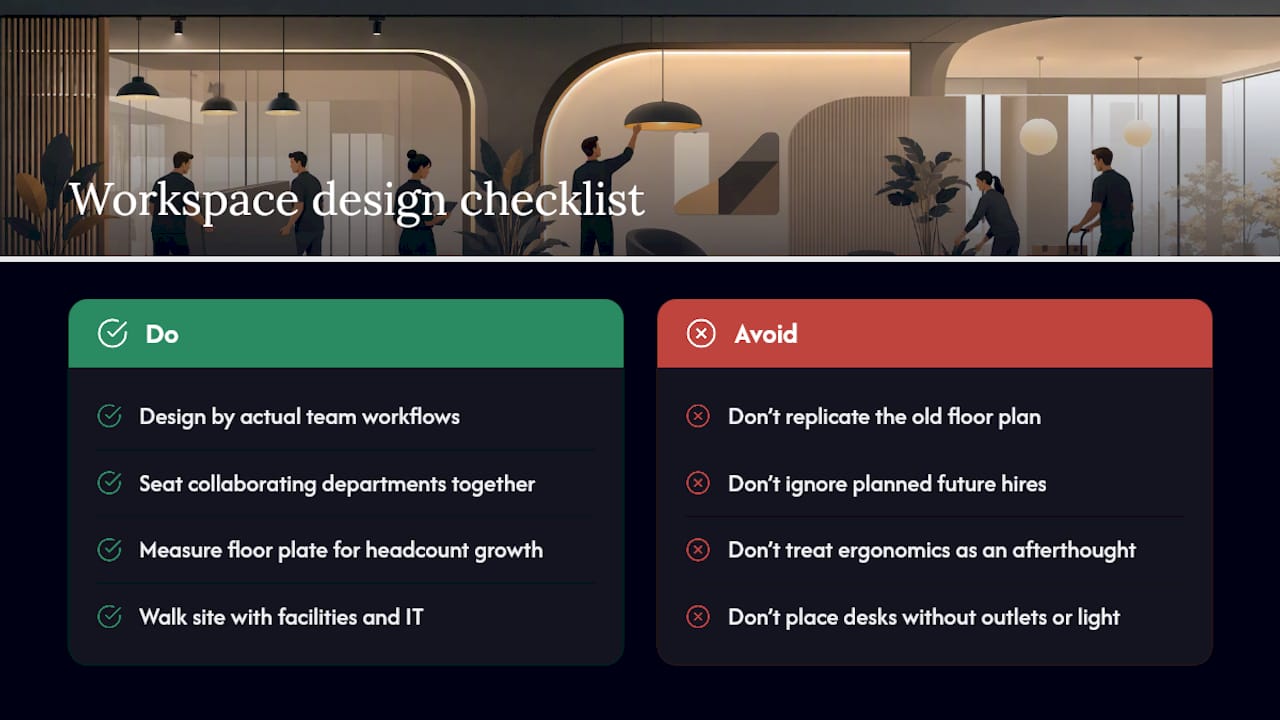
A new office is a rare chance to fix problems your old layout never let you solve, and it’s worth treating that seriously rather than just replicating the old floor plan in a new shell.
Start with how teams actually work together, not how they’re currently seated. Departments that collaborate constantly should sit near each other; roles needing quiet focus deserve distance from high-traffic zones like kitchens or meeting rooms. Measure the new floor plate against your actual headcount, including planned growth, before finalising desk layouts, since a floor plan that fits today’s team perfectly leaves no room for next year’s hires.
Ergonomics deserves genuine attention here, not an afterthought. Adjustable-height desks, proper monitor arm mounts, and chairs that suit a range of body types cost more upfront but cut down on the workplace injury claims and sick days that come from poor setups. Check natural light distribution across the floor plan too. Desks placed too far from windows or under harsh overhead lighting affect concentration and mood more than most managers expect.
Walk the new office with your facilities and IT leads before furniture arrives, and map power outlet locations, network points, and cable runs against your intended desk layout so nobody’s improvising extension cords on day one. If new interior finishing work is part of the fit-out, a partner resource like One Day Doors & Closets’ guide to home and office finishing touches covers practical ideas for doors, storage, and layout that translate well to a commercial fit-out too.
Every failed relocation traces back to the same two gaps: no single decision maker, and IT tested too late to fix problems before shutdown. Insurance and vendor experience aren’t formalities. They’re what stops a bad day becoming a bad month.
— Dinshaw
Commercial office relocations can be handled end to end, from IT-led moves and specialist equipment handling through to packing, short-term storage, and end-of-lease cleaning at the site you’re vacating. That last part matters more than most managers realise. A cleaning and make-good gap between “trucks left” and “lease officially closed” is where avoidable costs creep in.
If you’re coordinating a relocation with a fixed move date and IT dependencies you can’t afford to get wrong, a dedicated moving service built for stress-free commercial relocations takes the logistics off your plate rather than adding another spreadsheet to manage. Request a quote, share your floor plan and rough headcount, and get a realistic timeline back before you commit to a move date with your landlord.
Cover four phases: long-range planning (budget, lease review, coordinator appointment), mid-stage preparation (inventory, IT audit, vendor quotes), final prep (logistics confirmation, staff comms), and post-move tasks (address updates, system testing, invoice reconciliation).
Keep it factual and simple: business growth, lease expiry, or the need for a location better suited to current headcount. Regulatory bodies like ASIC generally just need the new address confirmed, not a detailed justification.
Appoint one move coordinator as the single point of contact, run a full IT audit months in advance, and sequence the shutdown and reconnection of your systems so network and phones come back online first. Onyx Removals’ 8 to 12 week project plan template lays out this sequencing in detail.
Pack your own desk items separately from shared equipment, label everything according to the colour-coded key your coordinator circulates, and keep an essentials box with chargers and documents accessible on move day rather than buried in a numbered crate.
Book commercial removalists and confirm ISP circuit activations at least 6 to 12 weeks out, since telecom lead times often run several weeks and experienced commercial vendors get booked out well ahead of peak moving periods.

No Related Post


