



Packing every last box in your Melbourne home comes with a sense of achievement, but the thought of transferring your ADT security system can quickly add stress to your moving checklist. Security isn’t as simple as lifting furniture—every detail matters for ongoing protection. Melbourne homeowners want more than a basic move; they expect their property and family to remain safe every step of the journey. This guide highlights the important process behind a professional, stress-free ADT relocation, so your household stays covered without missing a beat.
| Point | Details |
|---|---|
| Timely Notification to ADT | Notify ADT of your move at least two to three weeks prior to ensure a smooth relocation of your security system. |
| Understand Your System Type | Know whether you have a landline, internet, or cellular-based ADT system, as this will influence transferability and installation needs. |
| Plan Moving Day Coordination | Schedule ADT’s installation immediately after moving in to avoid any security gaps during your transition. |
| Document Everything | Keep a record of all communications, service confirmations, and notifications regarding your ADT account for clarity and protection. |
When you’re moving house in Melbourne, your ADT security system doesn’t simply move with you like your furniture does. ADT (American District Telegraph) systems are professionally monitored alarm networks that require proper relocation to maintain continuous protection at your new address. Understanding what this process involves can save you weeks of gaps in your home security coverage, especially when you’re vulnerable during the moving period itself.
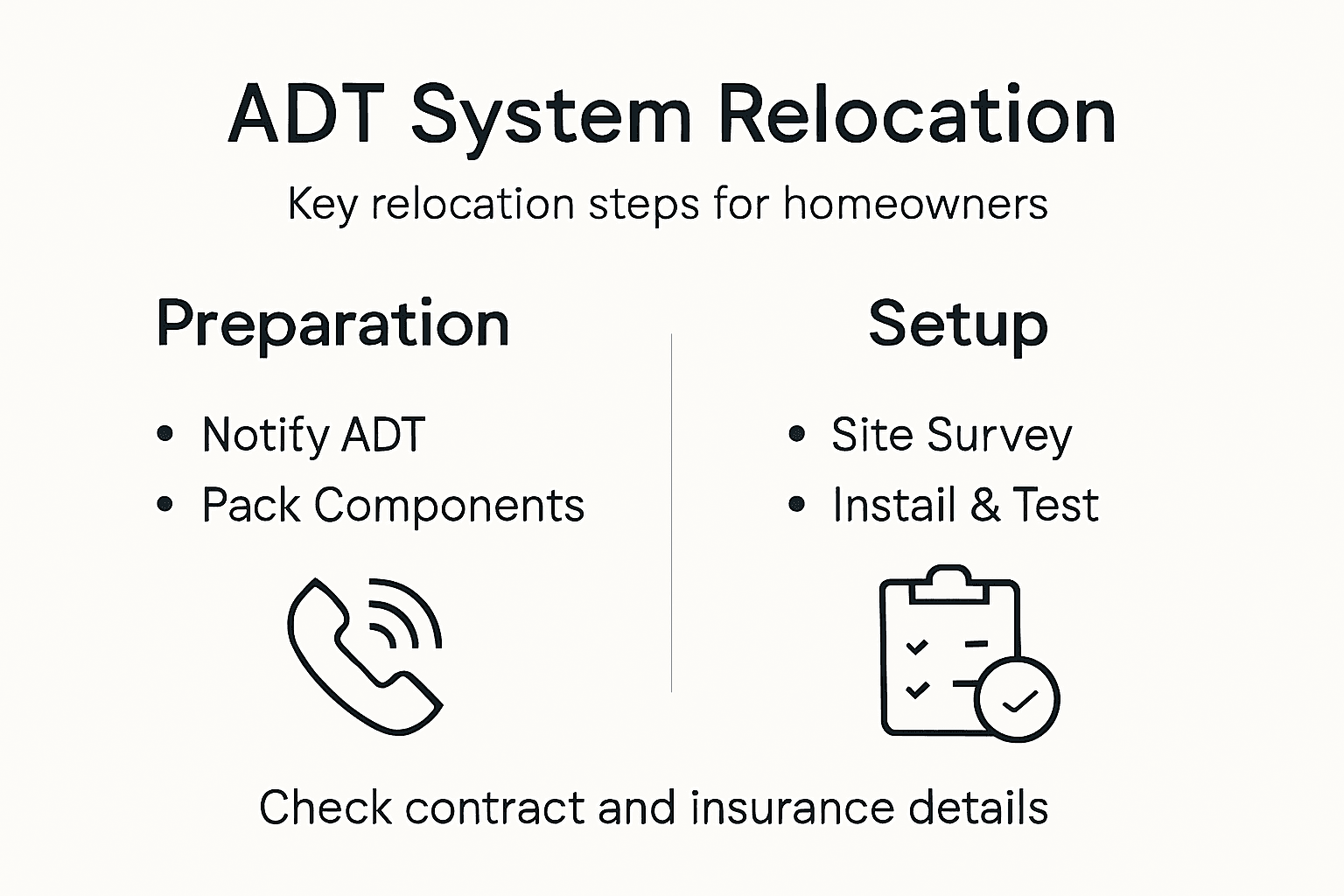
The relocation process begins well before moving day. You’ll need to contact ADT directly to inform them of your address change, typically at least two to three weeks ahead of your move. During this conversation, you’ll arrange for a technician to visit your new property to assess what equipment needs transferring and what new installation might be required. Your existing sensors, keypads, and monitoring devices don’t always transfer seamlessly between properties. Different homes have different layouts, entry points, and structural considerations that affect where sensors should be positioned. When updating your address with government agencies, you should simultaneously notify ADT to ensure your monitoring account stays current and your new property is protected from day one.
The actual relocation involves several technical steps. ADT technicians will disconnect your system from the old property, often transferring compatible equipment to your new home, then reinstalling and reconfiguring it to match your new layout. Some older equipment may not be worth transferring, particularly if your new home requires additional sensors or a different control panel setup. You’ll also need to update your monitoring contract to reflect any changes in system configuration or additional monitoring requirements. It’s worth knowing that this isn’t a DIY situation. Attempting to disconnect or reconnect professional monitoring systems yourself can result in service interruption or damage to the equipment.
Timing matters significantly during your move. Coordinate with ADT so that your system at the old property remains active until moving day, then schedule installation at the new property for immediately after. This minimises the window when your property lacks professional monitoring. Melbourne removalists like Onyx Removals can work around your ADT technician’s schedule to ensure no conflicts arise during the moving process itself. Planning this alongside your broader relocation timeline prevents the common scenario where homeowners arrive at their new property only to discover their alarm system won’t be operational for another week.
Pro tip: Schedule your ADT relocation appointment for the afternoon of moving day or the day after, allowing time for Onyx Removals to complete the physical move while your old system remains active for protection throughout the transition period.
Not all ADT security systems are created equal, and the type you have directly affects how smoothly your relocation will go. Your system’s design and communication method determine whether it can transfer to your new Melbourne home or requires upgrading. Understanding your current setup before moving day prevents costly surprises and ensures your new property receives the protection level you’re accustomed to.
ADT systems communicate through three primary methods, each with different transfer implications. Landline-based systems use your telephone line to send alerts to the monitoring centre, making them the oldest technology in circulation. These systems transfer easily because they rely on standard phone infrastructure available in nearly every Australian home. Internet-connected systems transmit signals through your broadband connection, offering faster alert delivery and additional features like smartphone control. These systems also transfer relatively painlessly, though your new property’s internet speed and reliability should be verified before installation. Cellular-based systems use mobile networks as their primary communication path, which is particularly valuable for Melbourne properties where traditional phone lines may be unreliable or unavailable. When relocating a cellular system, the main consideration is ensuring adequate mobile coverage at your new address, though cellular connectivity options are widely available across Australian metropolitan areas.
Your existing equipment’s age and compatibility play significant roles in transfer decisions. Newer systems with wireless sensors transfer more flexibly because sensors communicate with a central control panel without hardwired connections. Older wired systems may require substantial rewiring at your new property, sometimes making equipment replacement more cost effective than relocation. ADT technicians assess your new home’s layout to determine whether your current sensors, keypads, and monitoring devices suit the space. You might discover that your old system needs supplementary sensors for additional entry points or that your new property’s construction requires different mounting locations. Additionally, ensuring security system integrity during transfer protects against configuration errors that could compromise monitoring effectiveness.
Here’s a quick comparison of ADT system transfer methods and what to consider for each:
| System Type | Main Transfer Challenge | Property Check Needed | Best Suited For |
|---|---|---|---|
| Landline-based | Phone line availability | Active landline at address | Homes with phone connections |
| Internet-connected | Broadband speed/reliability | Internet ready before move | Smart features, remote access |
| Cellular-based | Mobile coverage consistency | Strong mobile signal | Properties with no landline |
Transfer options generally fall into three categories. The first involves transferring your entire existing system as is, most common when your new home has similar architecture and your equipment remains current. The second combines transferred components with new equipment, balancing cost savings with updated functionality. The third option replaces your system entirely, ideal when your current setup is outdated or incompatible with your new home’s requirements. Your ADT contract may offer flexibility here, potentially allowing system upgrades at reduced costs during your relocation. Before finalising moving arrangements with Onyx Removals, clarify with ADT which transfer option applies to your situation and what equipment changes they recommend for your new address.
Pro tip: Request a site survey from ADT at least four weeks before moving day, so you’ll know exactly which equipment transfers, what new components you need, and whether system upgrades make financial sense before finalising your relocation timeline.
Notifying ADT about your house move isn’t optional or something you can handle casually. Your security contract with ADT creates legal obligations on both sides, and failing to notify them properly can leave you without monitoring coverage, trigger unexpected charges, or complicate your service termination. Understanding the formal notification process protects your interests and ensures continuity of protection during one of your home’s most vulnerable periods.
The notification process begins with contacting ADT directly, ideally six to eight weeks before your moving date. Call their customer service line and provide your account number, current address, and new address along with your intended move date. ADT will document this information in your account, which triggers several backend processes. They’ll schedule a technician visit to your new property for a pre-move assessment, calculate any service adjustments needed, and confirm whether your current system transfers or requires modifications. During this initial call, ask about your contract’s specific requirements regarding address changes. Some contracts stipulate particular notice periods, whilst others have clauses about service interruption windows. Getting these details in writing prevents misunderstandings later. Notifying service providers about property changes is a critical step in any relocation, and ADT functions as both a service provider and a legal counterparty to your monitoring agreement.
Your legal obligations extend beyond a simple phone call. In writing, either through email or postal mail, provide ADT with formal notice of your address change at least four weeks before moving day. This creates a documented record of your notification, protecting you if disputes arise about service gaps or billing. Include your account details, current address, new address, and moving date in this written communication. Ask ADT to confirm receipt and provide written confirmation of the service changes they’ll make. This documentation becomes important if billing issues occur or if you later need to dispute charges related to the move. Additionally, understanding property transfer requirements and notifications helps you maintain comprehensive records of all address changes across your financial and legal obligations.
Coordinate your ADT notification timeline with your removal arrangements. Inform Onyx Removals about your ADT relocation schedule so they can plan around technician visits. Confirm with ADT exactly when your old system will be deactivated and when installation begins at your new property. Some ADT contracts include specific clauses about service suspension periods and whether you’re charged during gaps in monitoring. Clarify these points in writing before moving day to avoid unexpected charges. If you’re selling your current property, notify ADT whether the new owner has an existing security contract or if monitoring terminates completely. Request a final bill for your old address and confirmation that your new account begins on your specified date.
Pro tip: Send your formal written notification to ADT via registered post or email with read receipt, keeping copies of everything, then follow up with a phone call one week before moving to confirm they’ve received your documentation and scheduled your new installation.
Moving day arrives, and your ADT system requires careful attention alongside your furniture and belongings. Unlike your lounge or dining table, ADT equipment contains sensitive electronic components that demand proper handling to prevent damage that could compromise your monitoring capability at your new home. The way you transport and position this equipment directly affects whether your new property receives uninterrupted security from day one.
Before your removalists arrive, prepare your ADT system for transport. Photograph the current installation, including wire connections, sensor placements, and how the control panel is mounted. This documentation proves invaluable when your ADT technician sets up the system at your new address. If you’re transferring equipment rather than having technicians handle everything, label all cables and connections clearly. Use masking tape and a permanent marker to identify which wires connect to specific sensors or components. Pack the control panel in a sturdy box with protective padding, keeping it separate from heavy items that could crush or damage it during transit. Following safe manual handling practices when moving electronic equipment prevents injury and equipment damage, whether you’re handling the system yourself or directing your removalists.

On moving day, communicate clearly with your Onyx Removals team about where ADT equipment is located and how it should be treated. Point out the control panel, all sensors, keypads, and any other components that form your system. Request that they pack these items separately from your general household goods, treating them with the care you’d give to electronics or fragile items. Avoid stacking heavy boxes on top of ADT equipment, and ensure sensors and wiring aren’t bent, twisted, or compressed during transport. If your system includes hardwired components, be especially cautious because rewiring damage can be expensive to repair. Your ADT technician will handle final disconnection and reconnection, but the transport phase determines whether components arrive in working condition. When assessing risks during equipment movement, prioritise fragile electronics to prevent costly damage that extends your relocation timeline.
At your new property, create a designated space for ADT installation before the technician arrives. Identify where your control panel will be mounted, typically in an accessible location like a hallway or kitchen, away from direct sunlight and moisture. Ensure there’s adequate power access nearby, and confirm that your internet or landline connection (depending on your system type) reaches that location. If your new home requires structural modifications for sensor installation, discuss this with your ADT technician during the pre-move assessment. Have your photographs and cable labels ready when the technician arrives so they can efficiently reinstall your system. Test all components once installation is complete before your technician leaves, confirming that sensors trigger properly and the control panel communicates with the monitoring centre.
Pro tip: Pack a separate “ADT box” with all system components, keep it with you during the move rather than in the removalist’s van, and photograph the unpacked equipment at your new property before the technician reconnects everything as your proof of condition.
Your ADT relocation involves more than just physical movement of equipment. Your monitoring contract requires updating, costs will shift during and after your move, and insurance coverage needs attention to protect against gaps in protection or unexpected charges. Understanding these financial and contractual elements prevents unpleasant surprises and ensures you’re not overpaying for services or leaving yourself exposed during transition periods.
When you relocate, your ADT contract undergoes changes that directly impact your monthly fees. Your new property’s address, system configuration, and monitoring requirements may differ from your old home, affecting your contract terms and pricing. Contact ADT early to request a detailed cost estimate for your new address before moving day. Ask specifically whether relocation triggers any activation fees, equipment upgrade charges, or changes to your monthly monitoring rate. Some ADT contracts include relocation provisions that waive certain fees or offer discounted rates during transition periods, so review your original agreement carefully. Understanding contract changes during relocation helps clarify what costs you can expect and whether early termination penalties apply if you’re leaving your current provider. Request written confirmation of all costs before your move so there are no billing surprises on your first invoice at the new address.
Insurance coverage deserves careful consideration during your ADT relocation. Your homeowner’s or landlord’s insurance policy may have specific provisions about monitored security systems and how they affect your coverage terms or premiums. Contact your insurance provider to confirm that your policy remains active during the moving period and covers your property adequately if your ADT system experiences a gap in monitoring. Some insurers offer premium reductions for homes with professionally monitored systems, so you want to ensure you’re receiving any applicable discounts without interruption. Additionally, if you’re moving into a rental property, clarify with your landlord whether they require ADT to remain active and whether they’ll share the cost. Document all insurance communications in writing to protect yourself if claims arise related to the moving period.
Budgeting for relocation costs requires accounting for multiple line items beyond your standard monthly monitoring fee. Factor in ADT technician visit fees for the pre-move assessment and installation at your new property. If your new home requires additional sensors or equipment upgrades, these represent additional costs. Some relocation packages bundle these services at reduced rates, so ask ADT about available options. Tax implications of relocation expenses may allow you to claim certain moving costs as deductible expenses, depending on your circumstances. Keep all invoices and receipts related to your ADT relocation for tax purposes and to dispute any unexpected charges. Compare the total relocation cost against the value of maintaining your current system versus upgrading to new equipment, which may offer better long term value.
Below is a summary of potential costs and insurance steps for ADT relocations:
| Cost/Consideration | Description | When to Confirm |
|---|---|---|
| Technician fees | Charged for pre-move assessment | Before booking appointments |
| Equipment upgrades | Costs if older parts are not compatible | During site visit |
| Activation/relocation fee | May apply at new address | Before move day |
| Insurance notifications | Update insurer to maintain coverage | As soon as new address known |
Pro tip: Request an itemised quote from ADT at least three weeks before moving day, specifying every charge including technician visits, equipment transfers, new sensor installation, and any activation fees, then compare it against keeping your current system versus upgrading to newer equipment.
Service gaps during your move create real vulnerability. Even a single day without monitoring leaves your new home exposed to break-ins and theft during the chaos of relocation. Common issues arise when homeowners underestimate timing, fail to coordinate with ADT properly, or neglect to confirm installation before moving day concludes. Understanding these pitfalls and how to sidestep them ensures your new property receives continuous protection from the moment you arrive.
The most frequent mistake homeowners make is disconnecting their old system too early. You might assume that because you’re moving out on Friday, you should cancel ADT monitoring that same day. This logic seems reasonable until you consider that moving day rarely concludes neatly. Removalists may arrive later than expected, some items require additional time to load, and you might not physically leave your old property until evening. A burglar could exploit hours or even overnight exposure when your alarm is inactive. Instead, schedule your old system to remain active until the evening of moving day, then arrange for ADT installation at your new property to begin the next morning. This overlap of just a few hours provides continuous protection. Planning for service continuity during system transitions prevents security vulnerabilities that could have lasting consequences.
Another common issue involves communication breakdowns between you, ADT, and your removalists. You might contact ADT to schedule relocation, but if they don’t confirm the exact installation date in writing, misunderstandings occur. Your removalists might schedule collection for a specific time, but ADT technicians operate on their own schedule. Conflicts arise when a technician arrives at your new property only to discover you’re not there yet or that internet connectivity hasn’t been established. Prevent this by creating a detailed timeline document specifying exactly when your old system deactivates, when your removalists collect items, when you’ll arrive at your new address, and when ADT installation begins. Share this timeline with all parties at least two weeks before moving day. Request written confirmations from both ADT and Onyx Removals confirming they’ve received and understood your schedule.
Technical issues occasionally surface after installation. Your new home might have poor internet connectivity affecting your internet-based system, or cellular coverage might be inadequate for a cellular system. Your new property’s wiring might differ from your old home, requiring different sensor placements that you hadn’t anticipated. These issues typically emerge during the installation itself, which is why being present when your ADT technician arrives proves crucial. Don’t arrange to arrive at your new property hours after installation begins. Stay available so you can address any complications immediately. Resolving service reliability issues requires active engagement with your provider when problems emerge, so maintaining open communication throughout installation prevents minor issues from becoming major gaps in coverage.
Pro tip: Create a moving day contact sheet listing ADT’s emergency number, your removalists’ contact, and the technician’s direct line, keeping it accessible on your phone so you can immediately address any coordination issues or installation delays that threaten to create service gaps.
Moving with a complex ADT security system demands precision and care to avoid costly service gaps or equipment damage. The challenges of coordinating timely disconnection and reinstallation alongside physical relocation can create stress and vulnerability during this critical period. Whether it is coordinating with ADT technicians or organising the delicate transport of sensors and control panels, you need a moving partner who understands these vital details.
At Onyx Removals, we specialise in seamless residential moves that respect the intricacies of your home security setup. Our experienced team works closely with you and your ADT providers to create a customised relocation plan that minimises downtime and safeguards every component of your security system. From careful packing to timely delivery and setup assistance we ensure your new Melbourne property is protected from day one with no compromises.
Secure your specialised move today with our trusted experts in residential relocation.
Don’t risk unexpected security gaps or damaged alarm equipment during your relocation. Contact Onyx Removals now to arrange a personalised moving plan that integrates smoothly with your ADT relocation timeline. Take the first step toward a stress-free, secure move by requesting a quote or consultation today.
To begin the ADT relocation process, contact ADT directly at least two to three weeks prior to your move. Inform them of your address change and schedule a technician to assess your new property for equipment transfer and installation.
Before moving day, photograph your ADT system’s installation, label all cables and connections, and pack the control panel carefully in a sturdy box. This will help the technician reinstall your system efficiently at your new home.
The relocation process typically involves a technician visit for assessment followed by the actual installation at your new property. It’s essential to schedule these appointments timely to avoid gaps in monitoring. Plan to have your old system remain active until the new installation is completed.
Yes, there may be additional costs for technician visits, equipment upgrades, or activation fees associated with moving your ADT system. It’s best to request a detailed cost estimate from ADT before your move to understand any potential fees.

No Related Post


