



Office move management is the disciplined process of planning, coordinating and executing a business relocation so operations, staff and data stay protected throughout. The single most useful thing a manager can do today is appoint a named move lead and set three or four written objectives for the move. Everything else, from the timeline to the vendor brief, flows from that decision, and this guide walks through the phases, checklists and risk controls that make it stick.
TL;DR:
- A successful office move depends on appointing a clear move leader and establishing objectives before planning the asset inventory, risk assessment, and vendor contracts.
- Managing risk involves detailed planning for data security, manual handling, and vendor compliance, with specific controls during the move to prevent data loss and injury.
- Staff engagement and communication early in the process minimize resistance and uncertainty, making the change smoother and preserving workplace culture.
- The timeline must account for potential delays in IT infrastructure, permits, and fit-out work, with costs increasing sharply from late decisions or incomplete inventories.
- Hiring professional movers is recommended once inventory and risks are clear, to free internal resources for communication and IT management during the relocation.
Office move management spans far more than booking a truck. It covers moves, adds and changes (the ongoing shuffle of desks, equipment and teams), full relocations to a new address, restacks within an existing building, and consolidations where multiple sites merge into one. Each type carries different risks: a restack disrupts fewer external relationships but still demands the same asset tracking and communication discipline as a full move across town.
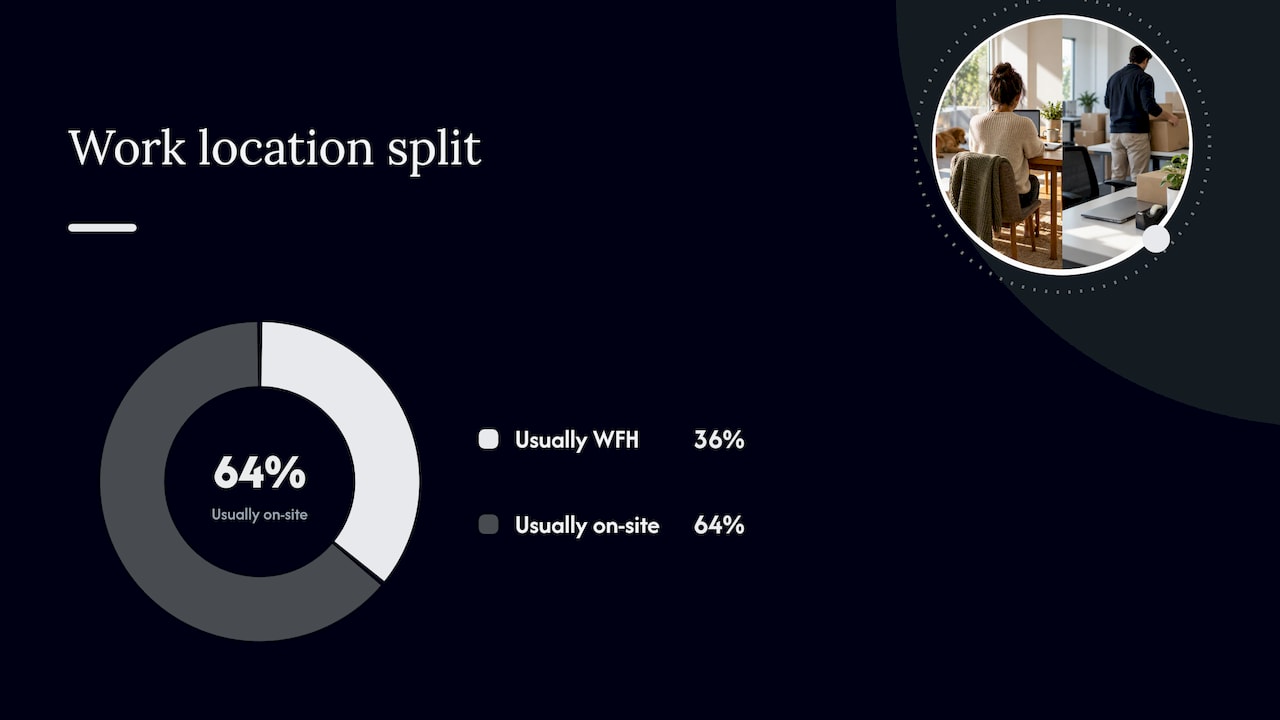
The reason this discipline matters has shifted with how people actually work. In August 2025, 36% of employed people in Australia usually worked from home, which means a headcount-based floor plan will almost certainly overshoot real demand for desks. Managers planning a new space now need attendance patterns, not org charts, to decide how many workstations, meeting rooms and lockers to fit out.
A move handled well protects three things at once:
Getting the scope right at the outset, relocation, restack or consolidation, shapes every decision that follows, from the size of the team you need to the length of the timeline.
A move needs a governance structure before it needs a mover. That means naming a move owner who holds the budget and the decision rights, a small steering group of department heads who can unblock issues fast, and a cross-functional relocation team covering IT, facilities, HR and finance. Without this structure, decisions stall on whoever happens to answer email fastest.
Three records underpin the whole programme:
Vendor procurement deserves its own checklist rather than a rushed phone call: confirm licensing and insurance, ask for method statements on manual handling, and get a written schedule that names the move-day contact. These four elements, governance, registers, risk plan and vendor checklist, are what separate a controlled move from a scramble.
Breaking the move into three phases keeps the plan honest about what happens when. Each phase has its own priorities, and skipping ahead (booking movers before finishing the inventory, for instance) is where most budgets blow out.
Before the move:
During the move:
After the move:
Pro Tip: Run a two-day pilot move of one team or floor before the full relocation, it surfaces the gaps in your plan while the cost of fixing them is still small.
A relocation is a change event long before it is a logistics event. Staff read the move date, the new floor plan and the silence in between as signals about whether the business has its act together. Treating the move as an extended change process, with early consultation and a clear plan of outcomes, owners and milestones, keeps trust intact through the disruption, as Business recommends.
Uncertainty is the main cost here, not the move itself. Comcare’s guidance on managing change at work advises early and regular communication to reduce the psychosocial risk that comes with organisational disruption. Practical steps that support this:
Pro Tip: Ask each move champion to send one line of feedback a week, even “nothing to report”, it keeps the channel alive and catches small issues before they become resistance.
Every move is also a data-handling event, and it needs to be planned as one. Start by building an information asset register that maps where sensitive records, physical and digital, actually sit before anyone starts packing boxes.
Under APP 11, organisations must take reasonable steps to secure personal information, which includes planning for its secure handling, transport, and destruction or de-identification once it is no longer needed, as set out in OAIC’s guide to securing personal information. Inventorying information assets early is one of the highest-value tasks in the whole move, because it heads off privacy incidents and IT downtime at the same time.
Practical controls to lock in:
Move day is when the physical risk peaks, and it is covered by the same work health and safety obligations as any other manual task. The Safe Work Australia model Code of Practice on hazardous manual tasks sets out how to identify hazardous tasks and apply the hierarchy of control, eliminating the task where possible, then substituting, engineering, administering or using personal protective equipment as a last resort.
For an office move that means:
A realistic office move timeline works backwards from the move date, with buffers built around the slowest-moving items: IT infrastructure, building access permits and fit-out works. These three routinely take longer than expected, so they anchor the critical path rather than sitting at the end of it.
Budget categories to plan for include:
The most common cost escalator is a late decision: choosing furniture, finalising floor plans or confirming access dates after the vendor has already quoted. An incomplete inventory is the second, because it forces change orders once the movers discover what is actually there. A written inventory and a locked decision date, set early, fix both.
Some tasks can’t wait for the perfect plan. This week, a manager should be able to:
Templates worth building rather than improvising on the day include a move-request tracker, an asset register, an IT cutover run sheet and a one-page vendor brief. For the systems layer, space-management platforms and ticketing tools, IFMA’s guidance on optimising move management in space-management software covers the process steps worth automating, without needing to commit to a specific product before the scope is settled. Onyx Removals’ own business relocation checklist covers the inventory, contractor and access-permit steps in more detail if you want a working template to adapt.
The mistake I see most often is treating the move as a logistics problem when it is really a people problem with a logistics component. Managers who name an owner, run a small pilot and communicate early get through the move with far less resistance than those who wait for a perfect plan. Experience coordinating office relocations shows that moves that go smoothly are the ones where someone was clearly accountable from day one.
— Dinshaw
Hiring a removalist makes sense once you know your inventory, your timeline and your risk points, because that is when specialist handling actually saves time rather than adding a layer to manage. A professional removalist handles the physical side of the relocation, from packing and transport through to storage and cleaning, so your internal team can stay focused on communication, IT cutover and staff support instead of lifting furniture.
Bringing in one provider for office relocation, packing, waste disposal and end-of-lease cleaning cuts down the number of contractors your move lead has to coordinate, which is often where timelines slip. If you’re building your budget, our pricing and service page gives you a starting point for a quote, and you can also check our office move project management overview to see how a coordinated move plan fits into your own timeline.
Costs vary widely depending on the size of the office, distance and how much IT and fit-out work is involved, so there is no single published figure that applies across the board. Budget for removalist fees, IT relocation, fit-out, cleaning, temporary storage and downtime as separate line items, and get quotes early to avoid the cost escalators that come with late decisions.
The core strategy is to appoint a single move owner, set written objectives, and run the move in three phases: before (planning and inventory), during (execution and safety controls) and after (verification and feedback). Treating the relocation as a change process, with regular communication and named move champions, reduces disruption alongside the logistics.
Employers are generally expected to consult staff and communicate changes affecting their work, including location, as part of good change management practice, and specific rights can depend on individual employment terms. If you have concerns about a relocation, raise them with your manager or HR team, since Comcare’s change guidance points to early consultation as the standard employers should be following.
An office move is the relocation of a business’s staff, equipment and operations from one workspace to another, ranging from a full move to a new address to a restack within the same building. It covers everything from planning and packing through to IT cutover and settling staff into the new space.

No Related Post


